

The Anatomy of a Modern Approval Workflow: 7 Components You Need (May 2026)
Learn the 7 components of modern approval workflows that cut cycle time from 4.7 to 1.8 days. May 2026 guide to routing, roles, and audit trails.
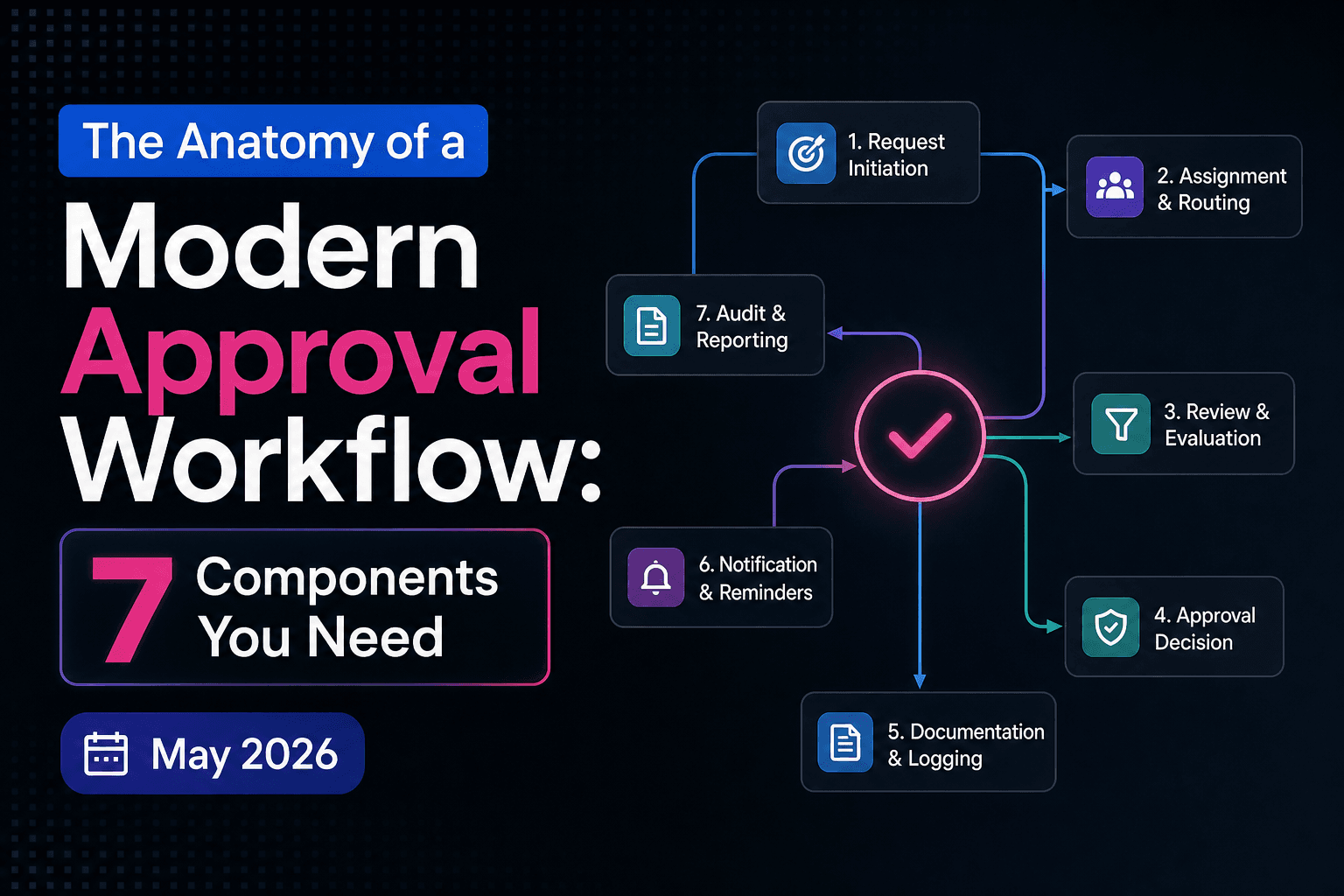
Most teams think their approval bottleneck is people moving slowly. It's not. It's unclear routing, missing escalation contacts, and no way to see who's actually holding the queue right now. The approval workflow components we're breaking down here are what separate a 1.8-day decision cycle from a 4.7-day one, and every single component solves a specific failure mode you're already hitting if you're running approvals through Slack threads. These components form the core of review and approval infrastructure.
TLDR:
- Structured workflows cut approval time from 4.7 days to 1.8 days vs. email or Slack review.
- Define four roles upfront: requester, reviewer, approver, and escalation contact.
- Parallel routing cuts cycle time when reviewers don't depend on each other's decisions.
- Standardize intake criteria so nothing enters review missing context or deadlines.
- Velt ships review and approval infrastructure with built-in audit trails and routing logic.
What Is an Approval Workflow
An approval workflow is a structured process that routes a piece of work through a defined sequence of reviewers, each of whom can approve, reject, or request changes before the work moves forward. At its core, it answers two questions: who needs to sign off, and in what order.
Most teams already have approval workflows. They're just running them through email threads and Slack messages. Tracking status, collecting feedback, and keeping a record of decisions becomes genuinely painful.
The Shifting Economics of Approval Workflows in 2026
Creation got cheap. Review didn't.
Between 2023 and 2025, the share of content produced with AI-assisted drafting jumped from 22% to 68%. More assets, same review capacity. The queue backs up at approval now, not production. Teams running structured approval workflows typically cut decision cycles to roughly half the time of teams relying on email and Slack. Across dozens of assets per month, that gap compounds fast. Approval is where content operations teams are leaving the most time on the table.
Component 1: Roles and Responsibilities
Every approval workflow has four distinct roles. Blur them and you get the classic "who's supposed to handle this?" standstill where assets sit untouched while each stakeholder assumes someone else is on it.
- Requester: submits the work and owns moving it through the process
- Reviewer: reads, annotates, and requests changes
- Approver: holds final sign-off authority
- Escalation contact: the tiebreaker when reviewers conflict or a deadline slips
The reviewer/approver distinction is where most teams go wrong. Reviewers can flag issues. Approvers unblock the work. When those roles overlap, feedback becomes impossible to categorize as blocking or advisory, and things stall indefinitely. Escalation contacts usually get skipped during setup, then desperately needed when two stakeholders disagree the day before launch. Define them upfront, before you need them.
Component 2: Submission and Intake Mechanisms
Approval workflows fail before they start when requests arrive incomplete. A reviewer opens the submission, finds no brief, no deadline, no supporting context, and the first action becomes asking what's missing. That delay is entirely preventable.
Good submission mechanisms capture what reviewers need upfront: the asset itself, a brief, a stated deadline, and any approval criteria specific to the request. Whether the team enforces that through a form, a required checklist, or a shared template is a tooling decision. What matters is that nothing enters the queue in a half-finished state.
That discipline pays off downstream. The most common intake failure isn't bad content. It's an asset rejected because a reviewer couldn't review it properly without context. Standardize what "ready for review" actually means, and the back-and-forth rejection loop mostly disappears before it starts.
Component 3: Approval Logic and Routing Rules
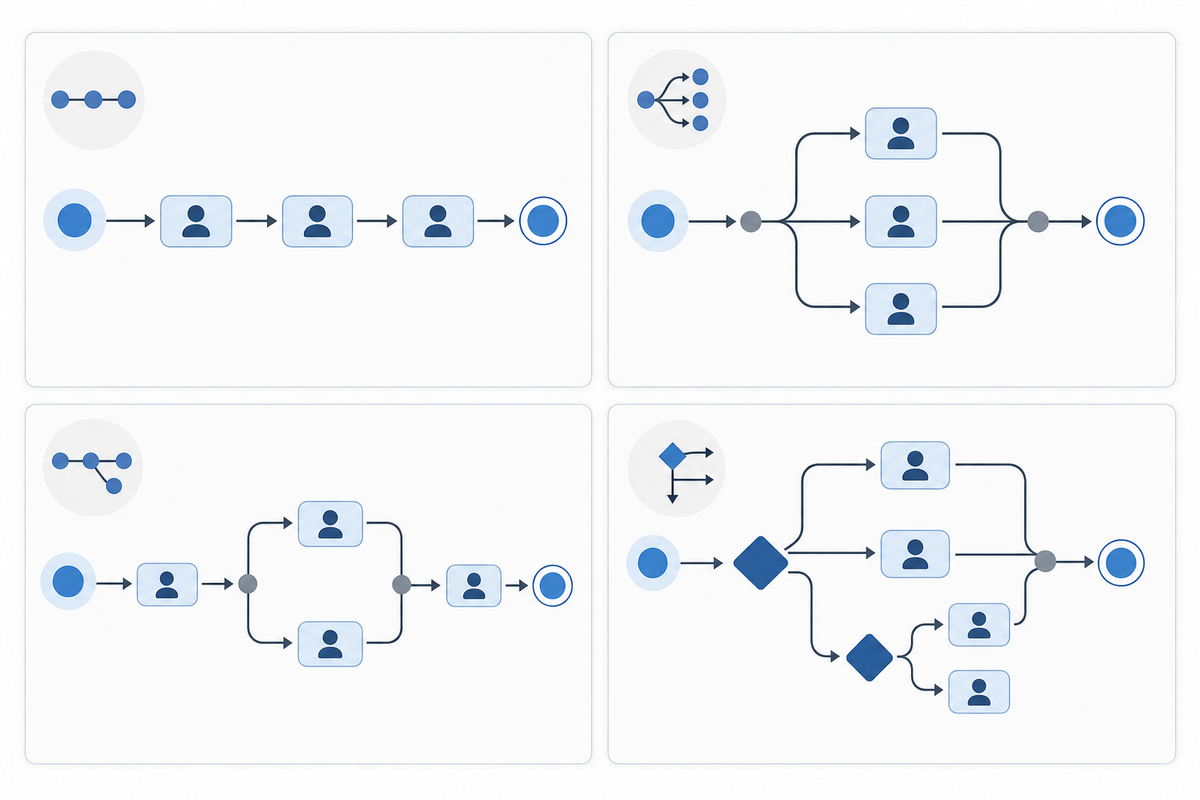
Routing logic is the decision engine underneath everything else. Most teams default to sequential routing (one reviewer at a time, in order) because it's simple. The problem: it adds wait time when reviewers don't actually depend on each other's decisions.
Parallel routing fixes that. Legal and compliance can review at the same time instead of one after the other. For independent sign-offs, this alone cuts cycle time without any process redesign.
Threshold-based and conditional routing take it further. Route a brief under $10,000 to the marketing manager; over $50,000, escalate automatically. Tag something high legal risk and it goes to counsel regardless of who submitted it. The rules run at submission time, so no one has to manually decide where something belongs. That question is what slows down ad hoc approval more than almost anything else.
Threshold-based and conditional routing take it further. Route a brief under $10,000 to the marketing manager; over $50,000, escalate automatically. Tag something high legal risk and it goes to counsel regardless of who submitted it. The rules run at submission time, so no one has to manually decide where something belongs. That question is what slows down ad hoc approval more than almost anything else.
| Routing Type | How It Works | Best For |
|---|---|---|
| Sequential | One reviewer at a time, in order | Linear decisions with dependencies |
| Parallel | All reviewers notified simultaneously | Independent reviews, faster cycles |
| Hybrid | Combination of sequential and parallel stages | Multi-department approvals |
| Conditional | Routes based on request attributes | Variable risk, tiered thresholds |
Component 4: Notifications and Escalation Protocols
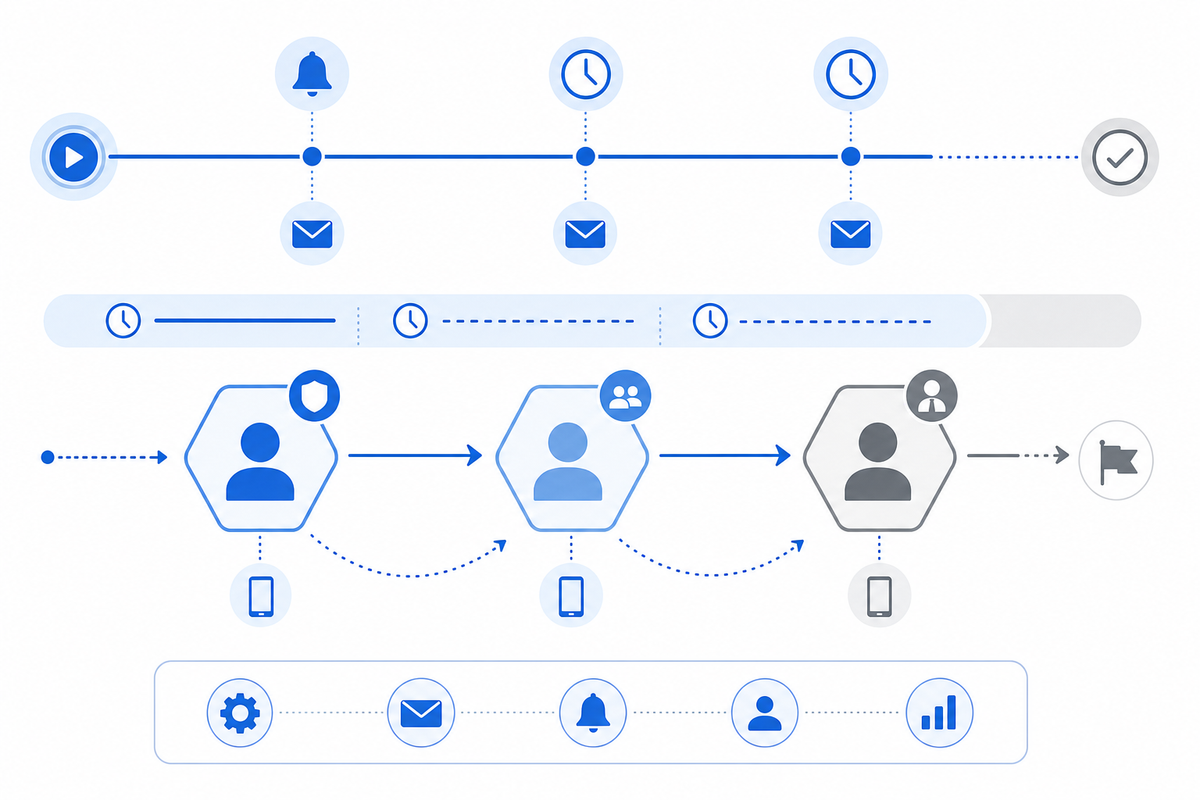
Routing gets work to the right person. Notifications get that person to act on it.
The gap between "assigned" and "reviewed" is where most approval delays actually happen. An automated notification at assignment closes that gap immediately. Reminder triggers at 24 and 48 hours catch items that got buried. Neither requires manual follow-up from the requester, which is what most teams are doing instead.
Escalation protocols handle what reminders can't. When a deadline passes and an approver hasn't responded, the workflow needs a rule for what happens next, not a person to notice it manually. That means setting SLA windows per request type and wiring up automatic escalation to a backup approver when those windows expire. Backup approver delegation separates a workflow with a single point of failure from one that keeps moving when someone's out of office or slow to respond.
"A notification system that fires once at assignment and never again is just a to-do list with extra steps."
The escalation chain should be explicit: primary approver first, then backup, then a manager-level contact if both miss the window. Each handoff should be logged with a timestamp so there's a clear record of when the escalation fired and who picked it up.
Component 5: Status Tracking and Visibility
Without visibility, every stakeholder becomes a manual status reporter. "Where is my request?" shouldn't require pinging anyone. A real-time approval dashboard solves this: current stage, time elapsed per step, and who holds the queue. That last part matters most. Tracking stuck assets for three days is actionable. Knowing it's "in progress" is not.
Cycle time metrics and approval completion rates turn bottlenecks from suspicions into data. If one reviewer stage consistently runs twice as long as others, that's a workflow problem worth fixing, not a people problem worth ignoring.
Component 6: Decision Criteria and Approval Standards
Undefined criteria are the most common reason approvals stall or get challenged after the fact. An approver inventing their standard each time will be inconsistent, slow, and hard to defend if a decision gets questioned. Predefined standards fix this. Before anything enters review, define what "approved" actually means: does it meet brand guidelines, fall within the authorized budget, and pass compliance checks on regulated claims? Explicit criteria turn a judgment call into a verifiable checklist.
Three categories cover most workflows:
- Compliance checks: regulatory language, required disclosures, legal sign-off on anything governed by policy
- Budget thresholds: spend-level authority mapped to specific approver roles so the right person signs off at the right dollar amount
- Quality standards: asset-specific criteria that must be met before sign-off, defined per request type rather than left to individual interpretation
Document these per workflow. Standards that live only in someone's head disappear when that person is out of office, and they can't be audited when a decision gets questioned months later. Marketing approval workflow optimization requires standardized briefs and tiered paths by risk.
Component 7: Audit Trails and Compliance Records
Every approval decision needs a paper trail. Audit trails capture who approved what, when they approved it, what version they reviewed, and any comments or conditions attached to the decision. Without this record, compliance audits become guesswork and accountability disappears.
Good audit infrastructure goes beyond simple logs. It records the full decision context: the state of the asset at approval time, the reviewer's identity, timestamps, and any escalations that occurred. In compliance-heavy industries, this isn't optional.
Velt builds audit trails directly into its review and approval infrastructure. As part of its collaboration infrastructure (comments, approval workflows, presence, notifications, audit trails, and recording), the audit trail record exists without any extra instrumentation.
Common Approval Workflow Bottlenecks and How to Fix Them
Approval friction adds up fast. On a 100-person team, 30 minutes of daily back-and-forth across stakeholders compounds into a meaningful productivity loss every week. Research on organizational bottlenecks shows they're best managed as interconnected systems, not in isolation. Most delays trace back to five patterns, each with a direct fix:
- Unclear routing: define conditional rules at submission time and skip manual routing after the fact
- Missing approvers: require backup delegation before any workflow goes live, not after the first missed deadline
- Insufficient visibility: surface who currently holds the queue, beyond overall status
- Over-engineered processes: audit stage count quarterly and cut any stage that hasn't blocked a real decision in two cycles
- No escalation rules: set SLA windows per request type with automatic escalation triggers wired in from the start
Build vs. Buy: Review and Approval Infrastructure for Product Teams
Building approval workflow architecture from scratch takes longer than most teams expect. You're looking at routing logic, state machines, notification delivery, audit logging, and a comment layer that stays in sync across concurrent editors. A realistic estimate is four to six months of engineering time before you have something production-ready.
Velt ships all of that as review and approval infrastructure you can wire into your app in days. comments, approvals, and audit trails are included out of the box.
If you're building a multiplayer whiteboard, Liveblocks is the better fit. But for product teams that need structured review and approval workflows with a real audit trail, Velt is purpose-built for that use case.
Final Thoughts on Approval Workflow Components
Approval bottlenecks cost more than most teams budget for. The fix isn't adding headcount, it's replacing manual handoffs with rules that execute automatically. Approval workflow architecture handles the state machines, notification triggers, and audit logs you'd otherwise build from scratch. Book a demo to see how the routing logic and escalation chains work in a live environment.
FAQ
Approval workflow Streamlit vs Reflex for internal tools?
Streamlit is faster for prototyping data-heavy internal dashboards with basic approval flows, but Reflex gives you full control over the UI and ships as a production-ready app. If you need custom routing logic or multi-department workflows, Reflex is the better fit.
Can I build approval workflows without building a full state machine?
Yes. Velt ships approval routing, notifications, escalation triggers, and audit trails out of the box so you don't have to wire up state machines, notification delivery, or logging infrastructure yourself.
How long does it take to implement approval infrastructure from scratch?
Building approval workflow architecture from scratch typically takes four to six months of engineering time once you account for routing logic, state machines, notification delivery, audit logging, and comment synchronization across concurrent editors.
What is dynamic routing in approval workflows?
Dynamic routing evaluates request attributes at submission time to automatically assign approvers based on predefined rules (budget thresholds, risk tags, request type) without requiring manual triage or decision-making after submission.
When should I use parallel routing instead of sequential approval?
Use parallel routing when reviewers make independent decisions that don't depend on each other's outcomes (legal and compliance reviewing simultaneously, for example). For workflows where one decision must happen before another, sequential routing is the right choice.