


How to Build a Messaging App from Scratch in 2026: Complete Developer Guide
Learn how to build a messaging app from scratch in March 2026. Covers WebSocket setup, scaling, security, and tech stack choices for real-time chat apps.
Building a messaging feature often starts as a simple project expected to take a few weeks to create a chat app, but quickly becomes complex with WebSocket authentication, message persistence, and message ordering issues. The basic functionality is straightforward, but edge cases consume development time. Network interruptions, concurrent user limits, and geographic latency turn what seemed like simple socket programming into a multi-month infrastructure project.
TLDR:
- Building a messaging app requires planning user types (consumer, enterprise, niche) and core features like real-time text delivery, persistence, and notifications before choosing your stack.
- WebSocket connections create persistent bidirectional channels with sub-second latency, replacing HTTP polling that wastes bandwidth checking for messages every few seconds.
- Scaling beyond thousands of concurrent users needs horizontal server clusters, Redis Pub/Sub for cross-server message routing, and load balancers with sticky sessions.
- Velt provides a JavaScript SDK that adds real-time chat, comments, presence, and notifications to your app without building WebSocket infrastructure or message queues.
What a Messaging App Is and Why Build One in 2026
The global instant messaging app market reached USD 179.85 billion in 2026 and continues growing as more businesses and consumers rely on real-time communication.
A messaging app is software that lets users send text, images, videos, and files to each other in real time over the internet. Unlike traditional SMS, these apps work across devices and offer features like group chats, read receipts, typing indicators, and media sharing.
Building a messaging app makes sense for different use cases. Consumer apps serve general audiences. Enterprise apps target workplace teams with channels and integrations. Niche apps serve specific communities, whether that's healthcare providers needing HIPAA compliance or gamers wanting voice chat during matches. Creating one from scratch gives you control over data, monetization, and features that existing apps don't offer.
Planning Your Messaging App: Requirements and Core Features
Defining the target audience is the first step. Consumer apps need simple onboarding and broad device support. Enterprise apps require admin controls and integration hooks. Niche apps might need specialized features like medical-grade encryption or gaming voice channels.
MVPs work best when focused on core functionality first. One-on-one messaging is simpler to build than group chats, which introduce complications like member management and message routing. Early decisions about multimedia support are important, since handling images and videos requires storage infrastructure and bandwidth considerations.
Every messaging app needs user authentication to verify identities, real-time text delivery with sub-second latency, message persistence so conversations survive app restarts, notifications for new messages, and connection handling for spotty networks.
Non-functional requirements matter just as much. Defining uptime targets, maximum message latency, and concurrent user capacity at launch shapes tech stack and hosting choices.
Features like read receipts, reactions, and typing indicators can be deferred to later versions.
Choosing Your Technology Stack for Real-Time Messaging
Backend choices affect how easily concurrent connections can be handled. Node.js excels at real-time scenarios because of its event-driven architecture. Python with Django or Flask works well for teams familiar with Python, though async libraries like asyncio are needed for WebSocket handling.
Database selection depends on data structure requirements. SQL databases like PostgreSQL work well for complex queries and relationships between users, groups, and messages. NoSQL options like MongoDB handle high write volumes better and scale horizontally more easily.
| Technology | Best For | Pros | Cons |
|---|---|---|---|
| Node.js + Socket.IO | Real-time web and mobile apps | Event-driven architecture, large ecosystem, excellent WebSocket support | Callback complexity, single-threaded limitations |
| Python + Django Channels | Teams with Python experience | Clean syntax, Django integration, strong async support | Slower concurrent connection handling than Node.js |
| PostgreSQL | Complex queries and relationships | ACID compliance, powerful querying, JSON support | Vertical scaling limits, slower writes at high volume |
| MongoDB | High write volumes and flexible schemas | Horizontal scaling, fast writes, document storage | Weaker consistency guarantees, complex joins |
| Redis | Message routing and caching | Sub-millisecond latency, Pub/Sub built-in, simple API | In-memory storage limits, persistence trade-offs |
WebSockets create persistent bidirectional connections between client and server, making them the standard choice for real-time messaging.
How to Create a Messaging App in Python
Python offers several approaches for building chat apps, from command-line tools to web-based messaging:
- Django Channels extends Django for WebSocket connections using ASGI to manage persistent real-time messaging.
- Flask-SocketIO wraps the Socket.IO protocol with minimal setup.
- Desktop apps use Tkinter or PyQt for GUI layers.
- Socket programming handles networking with the
socketlibrary for TCP connections, where servers broadcast messages to connected clients or peer-to-peer setups skip central servers entirely.
How to Create a Messaging App for Android and Mobile
Native Android development uses Java or Kotlin in Android Studio. Build activities for chat screens, implement RecyclerView for message lists, and apply Material Design components. Firebase Cloud Messaging handles push notifications when users leave the app. Cross-device frameworks let you write once and deploy to iOS and Android. React Native uses JavaScript with native components, sharing most of your codebase. Flutter uses Dart and draws its own UI for consistent appearance across devices. Both save time versus separate native codebases, though native gives direct control over device optimizations.
Building a Web-Based Chat Application
WebSocket API connects browsers to your chat server in real time without plugin downloads. React and Vue ship component libraries for chat UIs, though vanilla JavaScript reduces bundle size. Client code listens for incoming messages and pushes outbound text through the same persistent connection.
CSS Grid or Flexbox handle responsive layouts where message threads scroll separately from input fields. HTML5 semantic tags improve screen reader support, and CSS3 animates typing indicators without JavaScript overhead. Store auth tokens in HttpOnly cookies instead of localStorage to block XSS token theft.
Real-Time Communication Architecture and WebSocket Implementation
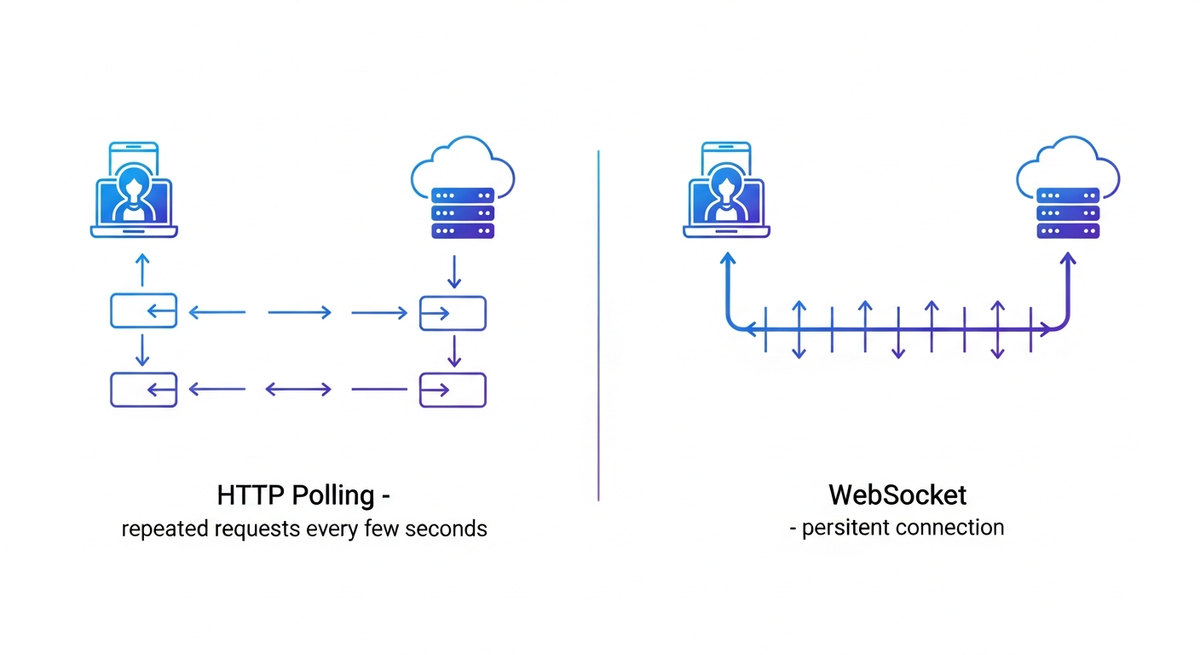
HTTP polling creates unnecessary bandwidth usage by checking for messages every few seconds. WebSocket replaces this with a persistent connection that supports bidirectional data flow, reducing latency from seconds to milliseconds. But WebSockets also improve the chat architcture in other ways as well:
- Connection management involves tracking active sockets on the server and associating each connection with a user ID for message routing. When messages arrive, the system looks up the recipient's socket and sends data directly through the open connection.
- Network failures are handled with exponential backoff: retry after 1 second, then 2, then 4, capping at 30 seconds. Unsent messages are queued locally and transmitted after reconnection.
- Heartbeat pings identify dead connections. A ping sent every 30 seconds expects responses within 5 seconds. Connections that don't respond are closed to clear stale sockets from the server.
Security, Authentication, and End-to-End Encryption
User authentication verifies identity before granting chat access. OAuth 2.0 integrates third-party logins like Google or GitHub. Username and password authentication requires bcrypt or Argon2 for password hashing, never storing plaintext credentials.
JWT tokens contain encoded user claims that the server validates on each request. WebSocket connections accept this token during the initial handshake, authenticating the entire session.
WSS encrypts WebSocket traffic with TLS, protecting messages between client and server. End-to-end encryption means only sender and recipient can read message content using public-private key pairs. Signal Protocol libraries handle key exchange and forward secrecy.
Scaling Your Messaging App for Growth

Over 60% of mobile app time goes to social media and messaging apps, creating pressure to handle massive concurrent connections. Horizontal scaling adds more servers instead of upgrading a single machine. Load balancers distribute WebSocket connections, but sticky sessions keep each user pinned to one server so messages route correctly. Redis Pub/Sub broadcasts messages across servers. When User A on Server 1 messages User B on Server 2, Server 1 publishes to Redis, which pushes to Server 2 for delivery. Message queues like Kafka buffer high-volume traffic, preventing server overload during spikes.
Free and Low-Cost Tools to Create a Messaging App
Firebase offers free tier hosting with real-time database access, authentication, and cloud functions that handle thousands of daily active users before billing kicks in. AWS Free Tier includes EC2 instances and RDS databases for 12 months. Heroku's free dynos work for small projects but sleep after 30 minutes of inactivity.
Open-source libraries reduce development costs. Socket.IO handles WebSocket connections, Rocket.Chat provides a self-hosted Slack alternative, and Matrix protocol supports decentralized messaging.
No-code builders like Bubble and Adalo let non-developers prototype chat interfaces through visual editors, though they limit customization and lock you into their hosting. Free tiers cap storage at 10-50GB and restrict concurrent connections to hundreds instead of thousands.
Common Challenges When Building a Chat Application
Although there are a lot of technologies ready to implement and best practices on building chat applications, there are still challenges:
- Message latency increases when servers process thousands of simultaneous connections. Geographic distance between users and servers creates 100-300ms roundtrip delays. CDN edge servers near users reduce this by routing connections to closer data centers.
- Offline sync requires queuing outbound messages locally with timestamps, then transmitting sequentially after reconnection. Version vectors prevent duplicate deliveries when network interruptions trigger multiple send attempts.
- Group chats amplify server load since each message reaches dozens of recipients simultaneously. Redis caching prevents repeated database queries for identical message content.
- Message ordering breaks during out-of-sequence delivery. Assign server-side sequence numbers and buffer messages client-side until gaps resolve. Lamport timestamps manage ordering across distributed servers.
Testing, Deployment, and Monitoring Your Messaging App
Even after the development is over, your work is far from done. To make sure you have a great user experience, you'll need to not simply test prior to deployment (to optimize for scalability, performance, and security) but implement a consistent monitoring strategy. Below are a few best practices to consider:
- Load testing simulates concurrent users before launch. Apache JMeter and Artillery create WebSocket connections at controlled rates; K6 writes tests in JavaScript and reports connection failures, latency percentiles, and throughput. Run tests against staging environments matching production to find server or database bottlenecks.
- Monitor message latency by timestamping outbound and inbound messages. Prometheus collects server metrics while Grafana visualizes latency and connection counts. Set alerts when latency exceeds 200ms or delivery rates fall below 99%.
- Deploy using blue-green strategies with two identical environments, switching traffic after verification. Canary deployments route 5-10% of users to updated servers first.
- Sentry captures exceptions with stack traces. Log WebSocket disconnections, authentication failures, and database timeouts.
Building Messaging Features Without Building from Scratch Using Velt
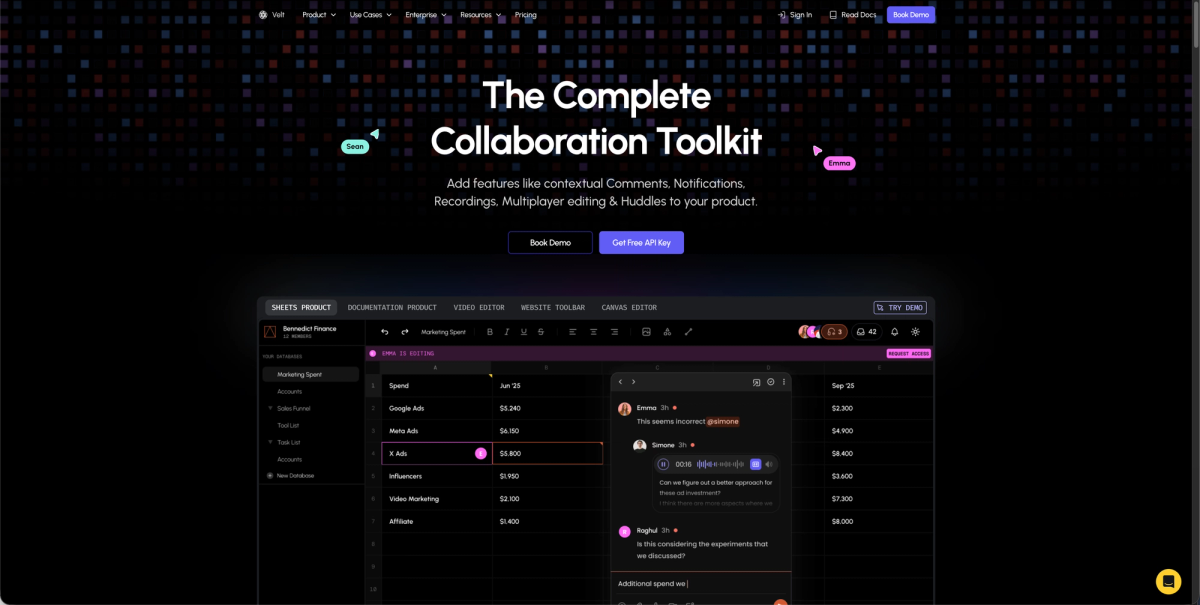
Adding chat to an app no longer requires building WebSocket infrastructure or managing message queues from scratch. Velt's SDK provides production-ready collaboration features in minutes instead of months. Velt handles tech stack challenges through WebSocket and Yjs infrastructure that manages real-time sync, conflict resolution, and connection handling automatically. The SDK provides in-app comments, live presence, notifications, and screen recording without requiring thousands of lines of backend code.
Velt operates as a middle ground between full custom builds and generic APIs. The solution provides DOM-aware positioning that binds messages to specific UI elements, unified notifications across the entire app hierarchy, and enterprise security with role inheritance and self-hosting options.
Deployment options include managed hosting or customer-controlled infrastructure depending on organizational requirements.
Final Thoughts on Chat App Development
This guide covers the full range of options for how to create a messaging app, from socket programming in Python to cross-device mobile frameworks. The hardest part is not writing the initial code but handling edge cases like offline sync and message ordering at scale. Architecture choices determine whether an app can handle 100 users or 100,000. Testing WebSocket connections under load before launch prevents costly production bottlenecks.
FAQ
How long does it take to build a messaging app from scratch?
A basic MVP with one-on-one messaging takes 2-4 weeks for an experienced developer, while a production-ready app with group chats, media support, and proper scaling infrastructure typically requires 3-6 months of development time.
What's the hardest part of building a real-time chat app?
Managing concurrent WebSocket connections at scale is the biggest technical challenge. You need to handle connection drops, implement message queuing, set up load balancing across servers, and prevent message ordering issues when thousands of users send messages simultaneously.
Can I build a messaging app without learning WebSocket programming?
Yes. Pre-built SDKs like Velt handle the real-time infrastructure so you can add chat features by integrating their API instead of building WebSocket servers, managing connection state, and writing message routing logic yourself.
Is Python a good choice for building messaging apps?
Python works well for messaging apps using Django Channels or Flask-SocketIO for WebSocket handling. The main tradeoff is that Node.js handles concurrent connections more efficiently due to its event-driven architecture, but Python is fine for small to medium-scale apps.
What's the difference between WebSocket and end-to-end encryption in messaging apps?
WebSocket (WSS) encrypts data between your device and the server so network traffic stays private. End-to-end encryption means only you and your recipient can read messages; even the server can't decrypt them. WhatsApp uses both layers together.